The letter that arrives once a year
Once a year your landlord or the building's property manager (Hausverwaltung) sends the Nebenkostenabrechnung, also called the Betriebskostenabrechnung. It sets the advance payments you made every month against the building's actual running costs, such as property tax, water, waste collection, the caretaker and insurance, and ends in either a top-up to pay (Nachzahlung) or a credit. Under BGB §556 the landlord has to deliver it within twelve months of the end of the billing period, and you have until the end of the twelfth month after it reached you to raise objections.
It is tempting to look at the bottom line, wince or shrug, and pay. The line items are written in German legal shorthand, and the rules that decide whether a line belongs there are spread across the Civil Code (BGB), the Betriebskostenverordnung (the operating costs ordinance) and the Heizkostenverordnung (the heating costs ordinance). Looking up every term one by one is slow, a paid check or a Mieterverein membership costs money, and meanwhile the twelve months run out quietly. Nebenklar sits in between: a guided look at your own statement that you can finish in one sitting.
How a check works
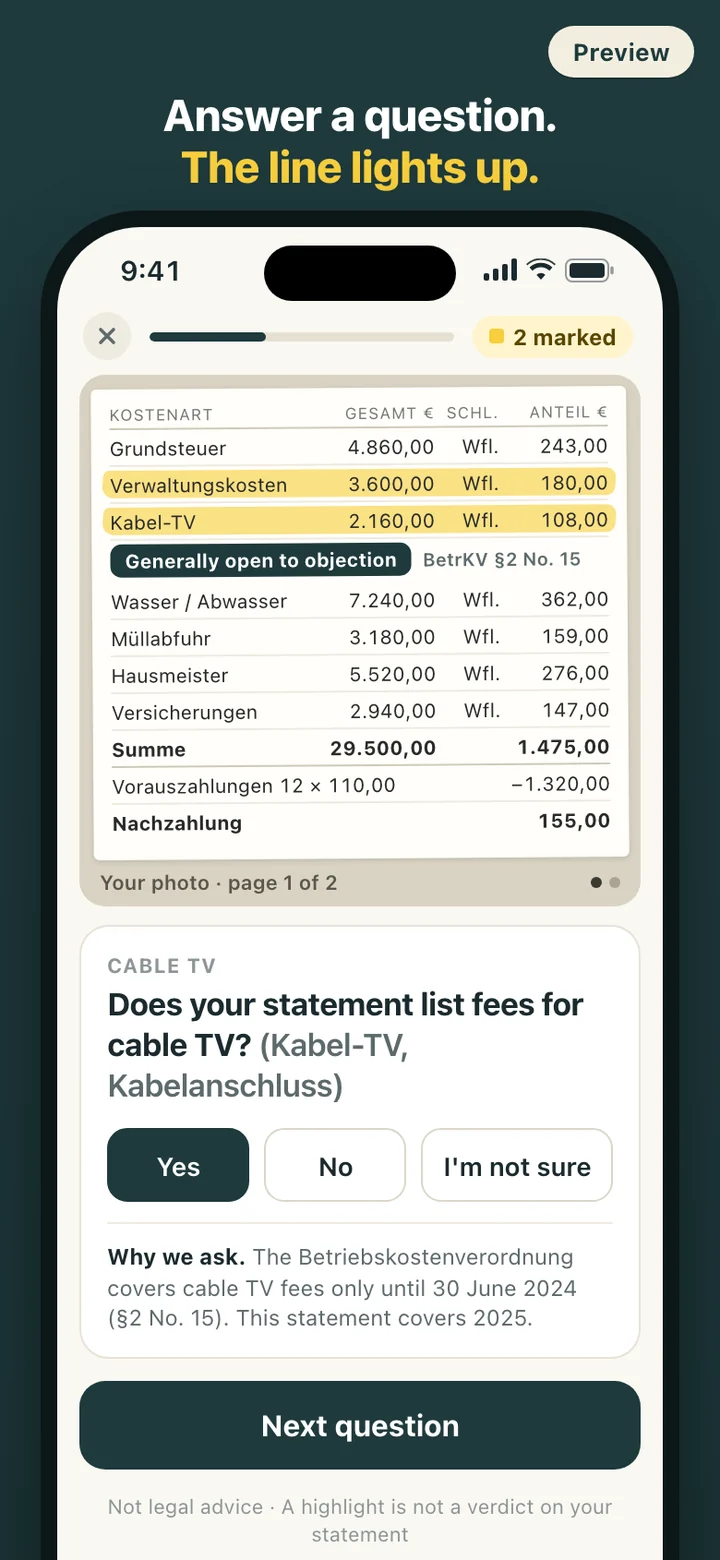
Open the app and tap Check my statement. There is no account to create and no setup screen in the way. You can photograph the statement first, including two or more pages, and keep the photo as a reference behind the questions, or skip the photo and work with item cards instead. Both modes use the same questions and the same highlights.
The questions come one per screen, with large answer buttons and a progress bar. Under each one a short line explains why it is asked and which rule it relates to, for example that the Betriebskostenverordnung excludes administration and repair costs from operating costs. German terms such as Verwaltungskosten, Umlageschlüssel (allocation key) or Vorauszahlungen (advance payments) stay visible next to the explanation, so you can find the same word on your letter.
If you cannot tell from the statement, answer I'm not sure. That line is not highlighted; it goes on a separate list of things to look up, so the check never pushes you into guessing. You can stop halfway and pick up later where you left off, and any answer can be changed afterwards, which updates the highlights and the report.
What a highlight means, and what it does not
A highlight means your answer matches a type of item that tenants can generally object to. It is not a verdict on your statement. Nebenklar does not judge your photo or your landlord's figures; the only thing that lights a line is what you answered. Where a rule depends on details the app cannot know, it says so and asks you to check rather than guessing.
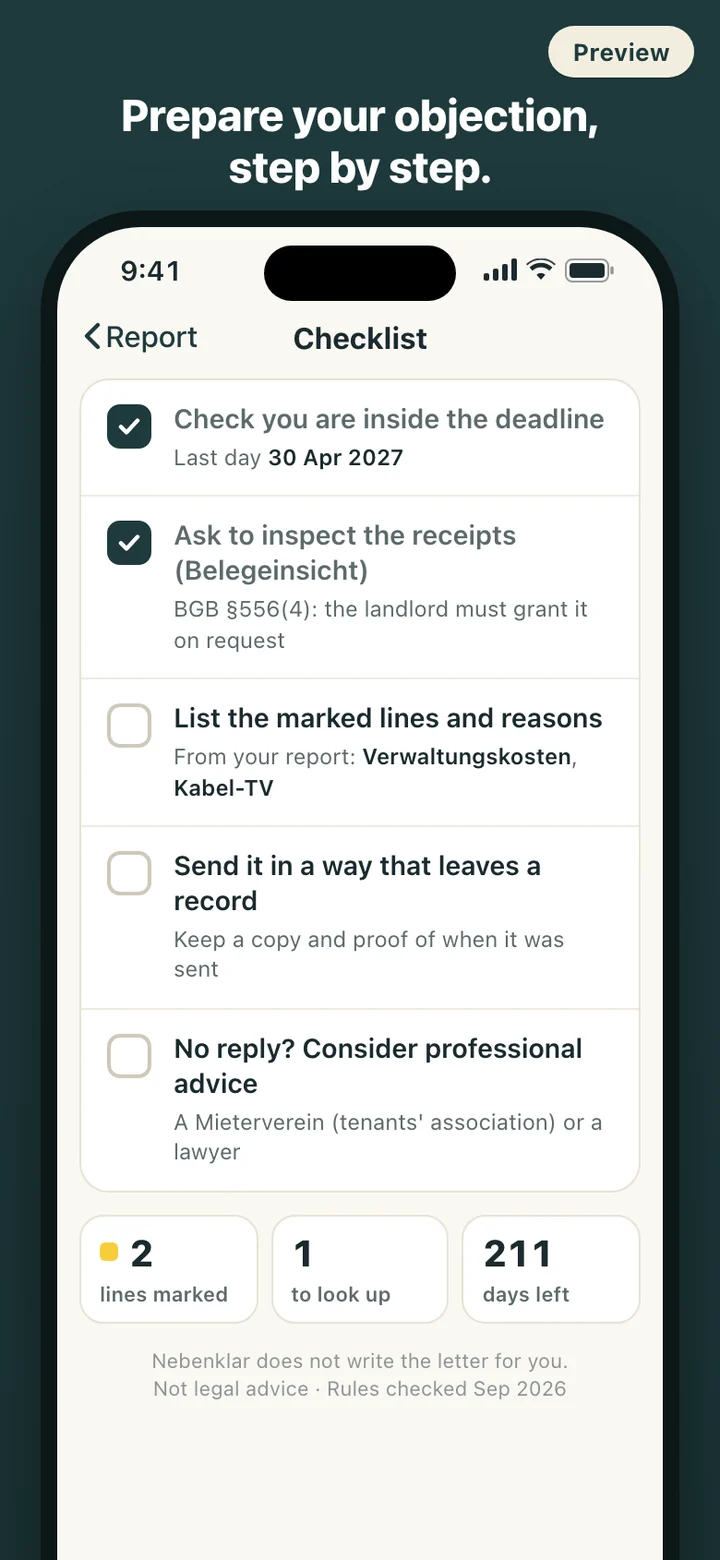
When you finish, the report lists every marked line with the reason, the legal section and the official source it rests on, followed by your I'm-not-sure list. Every rule carries the date it was last checked, because these rules change. Cable TV is the clearest recent example: the Betriebskostenverordnung covers cable TV fees only until 30 June 2024, which changes what a statement for 2024 or a later year can include. A check with no highlights at all is a perfectly good result too, and the report says so.
Two deadlines, one date to enter
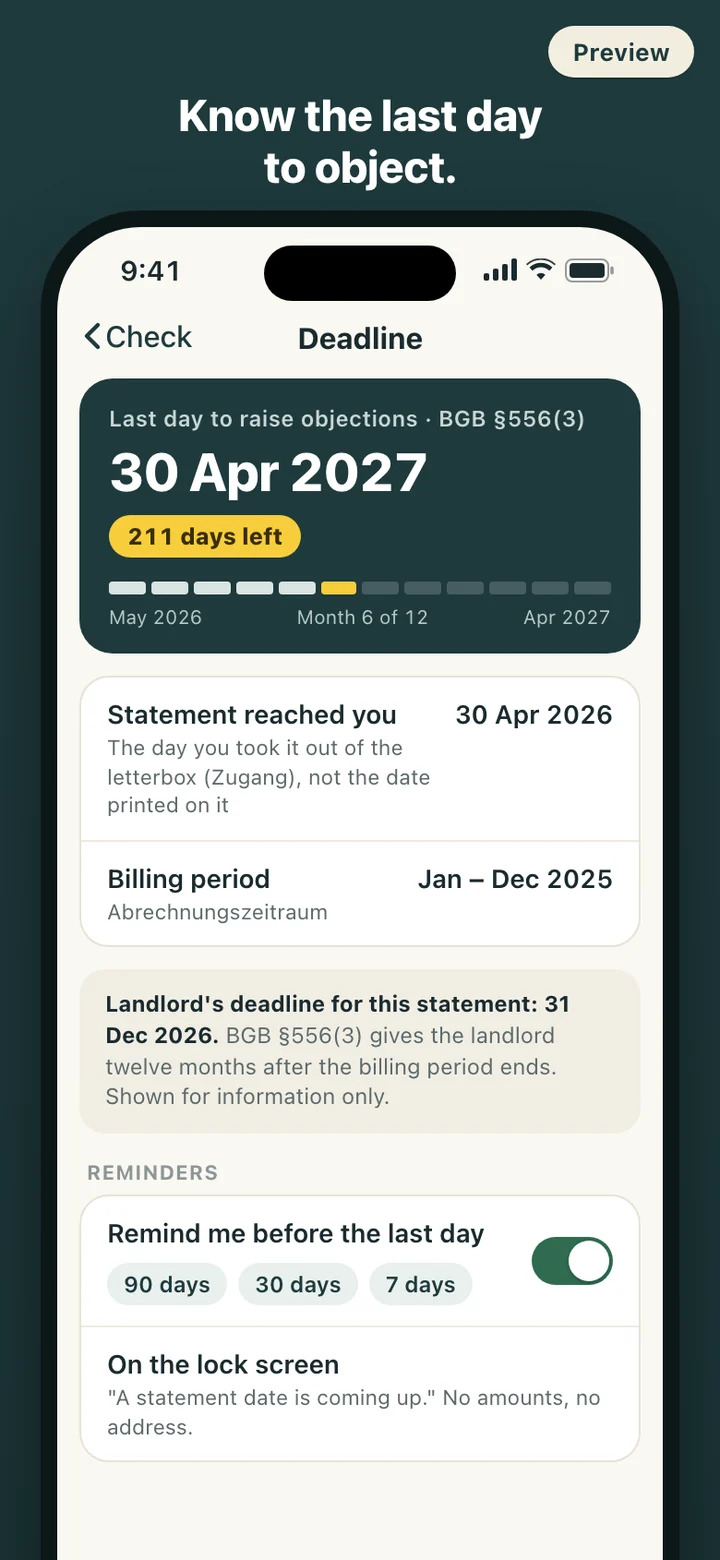
There are two twelve-month periods in BGB §556, and they are easy to mix up. The landlord's period runs from the end of the billing period: if the statement for a calendar year arrives later than twelve months after that year ended, the landlord can generally no longer claim a top-up, unless the delay was not the landlord's fault. Your period runs from the day the statement reached you. Nebenklar counts down the second one and shows the first as an information card next to it.
The date that matters is when the letter reached you (Zugang in the law), not the date printed at the top, so the app asks for the day you took it out of the letterbox. If the twelve months have already passed, it tells you plainly and leaves the question of exceptions to professional advice. Reminders are optional, ask for permission only when you switch them on, and can be moved to different lead times.
What it deliberately leaves out
Nebenklar does not write objection letters, put you in touch with particular lawyers or tenants' associations, or estimate how much money you might get back. It covers the yearly service charge statement for a rented home, and nothing beyond it: not rent increases, rent reductions (Mietminderung), deposits, commercial leases or the statements owners receive from their owners' association (WEG). Keeping to that scope is what lets every question rest on a named rule.
There is no server behind the app. Your answers, photos and dates never leave the phone, there is no analytics code inside, and the app makes no network requests. One action in Settings deletes everything, photos and scheduled reminders included. There is no cloud backup, so your check lives on this phone only.
Nebenklar is a self-check and organizing tool, not legal advice (keine Rechtsberatung). A highlight shows that your answer matches a type of item tenants can generally object to; it does not mean your statement is wrong. For a decision on your own case, talk to a Mieterverein (tenants' association) or a lawyer.