One lab report a year, and nowhere to keep it
The EPA estimates that more than 23 million US households rely on a private well for drinking water, and that water is not regulated under the federal Safe Drinking Water Act. The routine test the EPA and the CDC both recommend comes around once a year: total coliform bacteria, nitrate, total dissolved solids and pH. The report arrives as a page of numbers, gets read once, and goes into a drawer or an email folder.
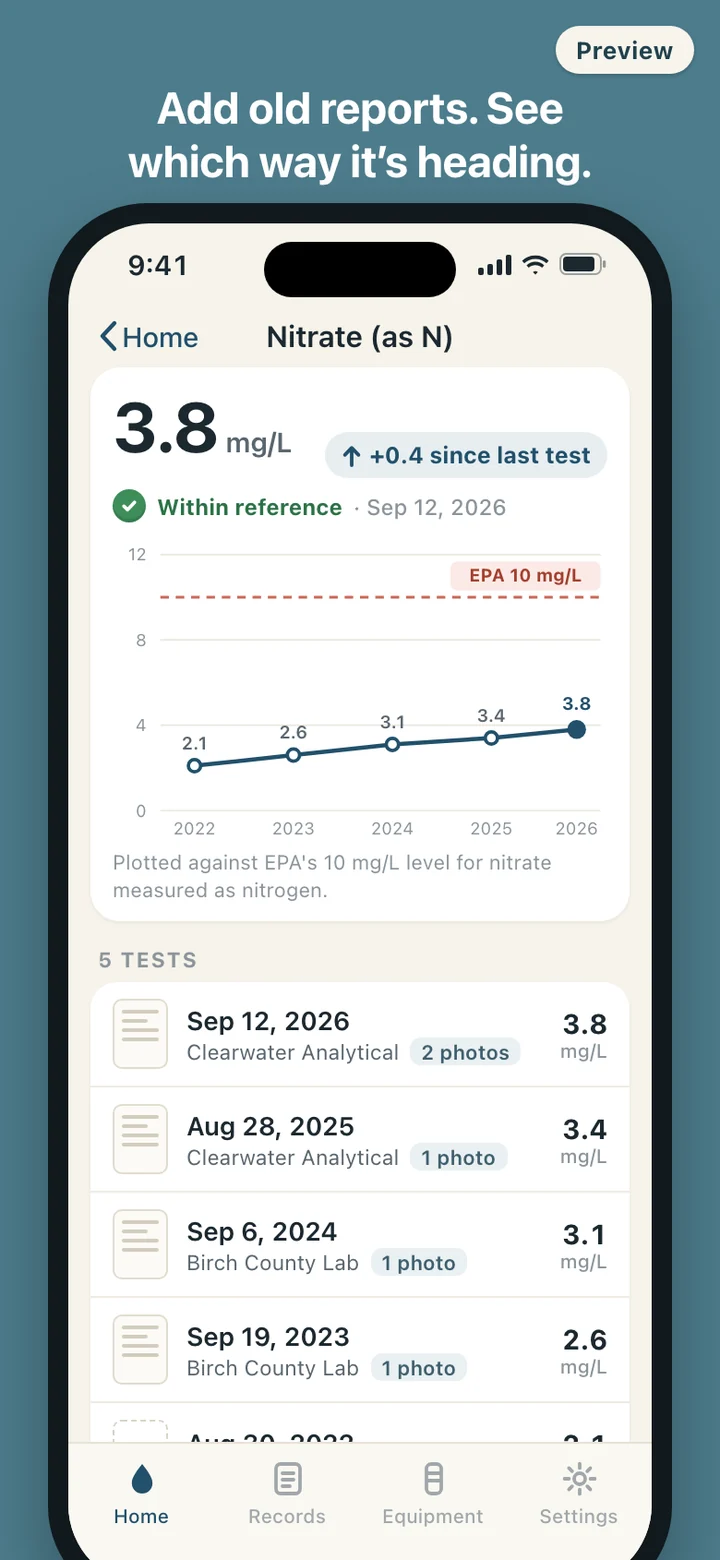
That is where the useful part gets lost. A nitrate result of 3.8 mg/L says one thing on its own and something else next to last year's 3.4 and the 2.1 from four years earlier. Most owners never see that line, because the reports are on paper, sometimes from different labs in different layouts, and the next test is twelve months away and easy to forget altogether.
What the green, amber and red mean
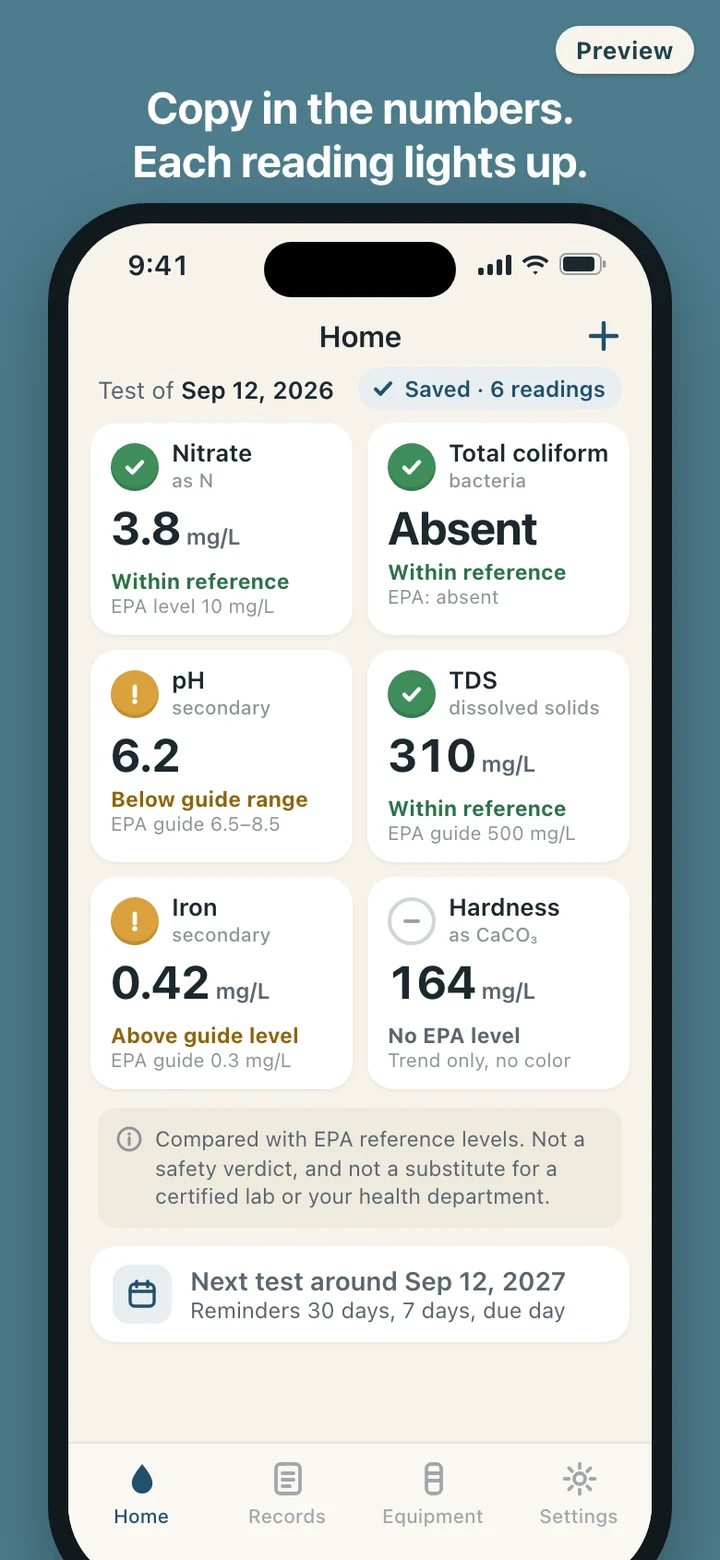
Each item in WellLedger carries the reference level the EPA publishes for it, and the kind of level it is. Health-based limits, such as 10 mg/L for nitrate measured as nitrogen or 1 mg/L for nitrite, can turn a reading red when it is over the line and amber when it is getting close. Secondary standards, which the EPA describes as non-enforceable guidelines for taste, color and odor, stop at amber: pH 6.5 to 8.5, iron 0.3 mg/L, total dissolved solids 500 mg/L. A pH of 6.2 shows as outside that range, never as red. Coliform bacteria are a present-or-absent result, and present lights red.
Items without an EPA number, like hardness, and any custom item you add get a trend line and no color at all. Every light is a color, an icon and a word, so the grid still reads for color-blind eyes, and one line under the grid never goes away: these are comparisons with EPA reference levels, not a verdict and not a substitute for a lab or your health department. WellLedger is not affiliated with the EPA or the CDC.
A red light never appears on its own. It comes with the next step the EPA itself gives, which is to have the well retested to confirm the result and to contact your health department, along with the contractor number you saved. The lights come on in a short sequence when you save a test, then stay still. Nothing on the screen blinks.
From the lab envelope to the lights
There is no account to create. The first screen asks for test results. Pick the test date, then go down the report in the order labs usually print it, typing each value on a large number pad. Units are fixed to each item, shown in mg/L with a note that this is the same as ppm. Skip whatever your lab did not test; only the items you fill in light up. Add the lab's name and a note if you like, then attach photos of the report pages from the camera or your photo library.
Older reports go in the same way under their own dates, so a drawer of past tests becomes a trend on the first evening. Every entry can be edited or deleted later if a number was mistyped.
If the well has never been tested, or you cannot remember when it last was, say so on the first screen. WellLedger turns on the yearly reminder and shows a short card with what the EPA and the CDC recommend testing each year, with a note to use a state-certified laboratory.
Filters, softener salt and the well itself
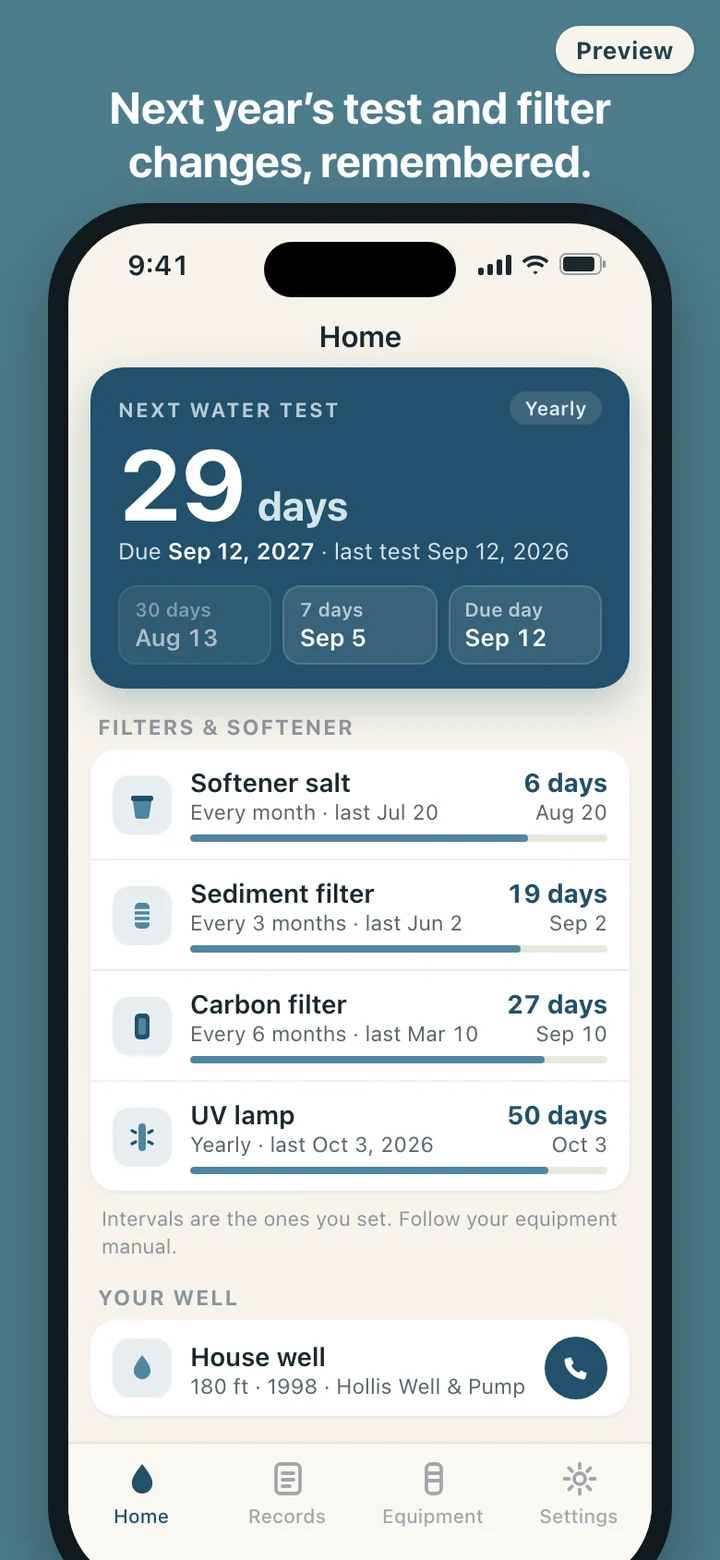
The equipment tab keeps a countdown for each piece of treatment gear you own: sediment and carbon filters, reverse osmosis cartridges, water softener salt, UV lamps, or anything you name yourself. You enter the interval in months and the date of the last change, and the app shows how many days are left and reminds you 7 days ahead and on the day. Log a change, with the cost if you track it, and the countdown starts over. The interval comes from your equipment manual, and the app says so next to the list.
A small well profile holds the details people otherwise hunt for when something goes wrong: a nickname, the depth, the year the well was drilled, and your well contractor's phone number, one tap from a call.
What it deliberately leaves out
WellLedger keeps records and compares numbers. It does not say your water is safe or unsafe, does not describe what a result means for anyone's health, and does not tell you to install a softener or disinfect the well. Those calls belong to a certified lab, your health department and the people who service your well.
It does not pair with test strips or sensors, does not read numbers off a photo of the report, and has no map or comparison with neighbors. It never asks for your location or microphone; notifications are requested only when you turn reminders on, and photo access only when you attach a report. Everything stays on the phone, with no account and no network requests. You can export a backup file of your results, equipment and history and restore it on a new phone; report photos stay on the device and are not inside that file, and the app tells you so. Delete all data in Settings removes the records, the photos and the scheduled reminders together.
WellLedger is a record-keeping tool. It compares the numbers you enter with published EPA reference levels and does not tell you whether your water is safe to drink. Ask a state-certified laboratory or your local or state health department what a result means for your household.