Knitting · for knitters and crocheters with more than one project going

YarnlineKnit & crochet WIP timeline

Yarnline is a project tracker for knitters and crocheters who always have more than one work in progress. You type in the names of what is on your needles and each project becomes a bar on a Gantt timeline, running from the day you cast on to today, so one screen shows what is active, what is hibernating, and which deadline is coming up. When you bind off, your photo plus the yarn, needle, and pattern details become a card you can share. Your projects and photos stay on your phone, with no account, no server, and no analytics.

  • Free
  • No ads
  • No in-app purchases
  • No account
  • Works offline
  • 45 languages
Get it onGoogle Play

Three moments

01

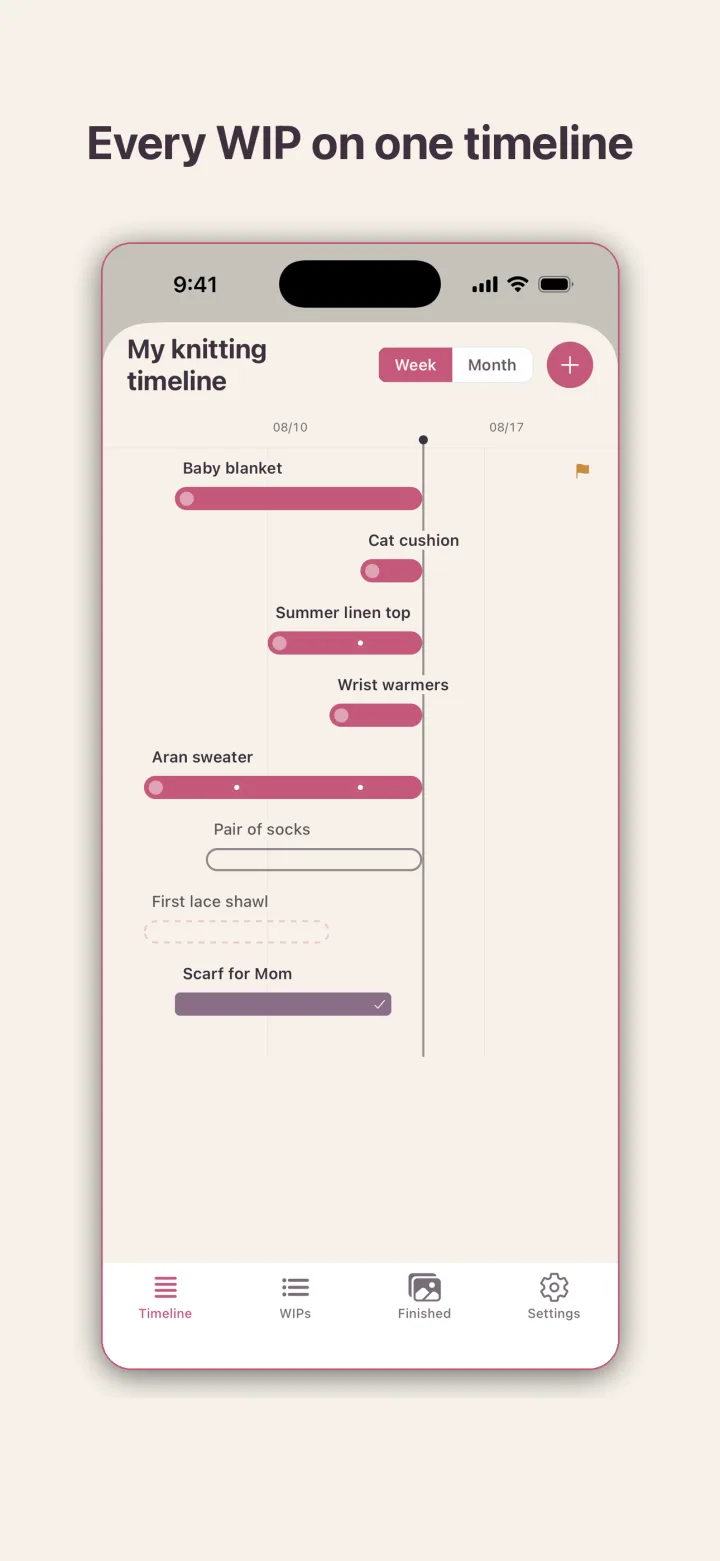
See every WIP as a bar on one timeline

The Timeline tab shows each project as a horizontal bar against a week or month scale, with a vertical line marking today. Active projects are solid bars, a finished one carries a check mark, a queued one is a dashed outline, and a small flag marks a deadline. Milestones appear as dots on the bar.

02

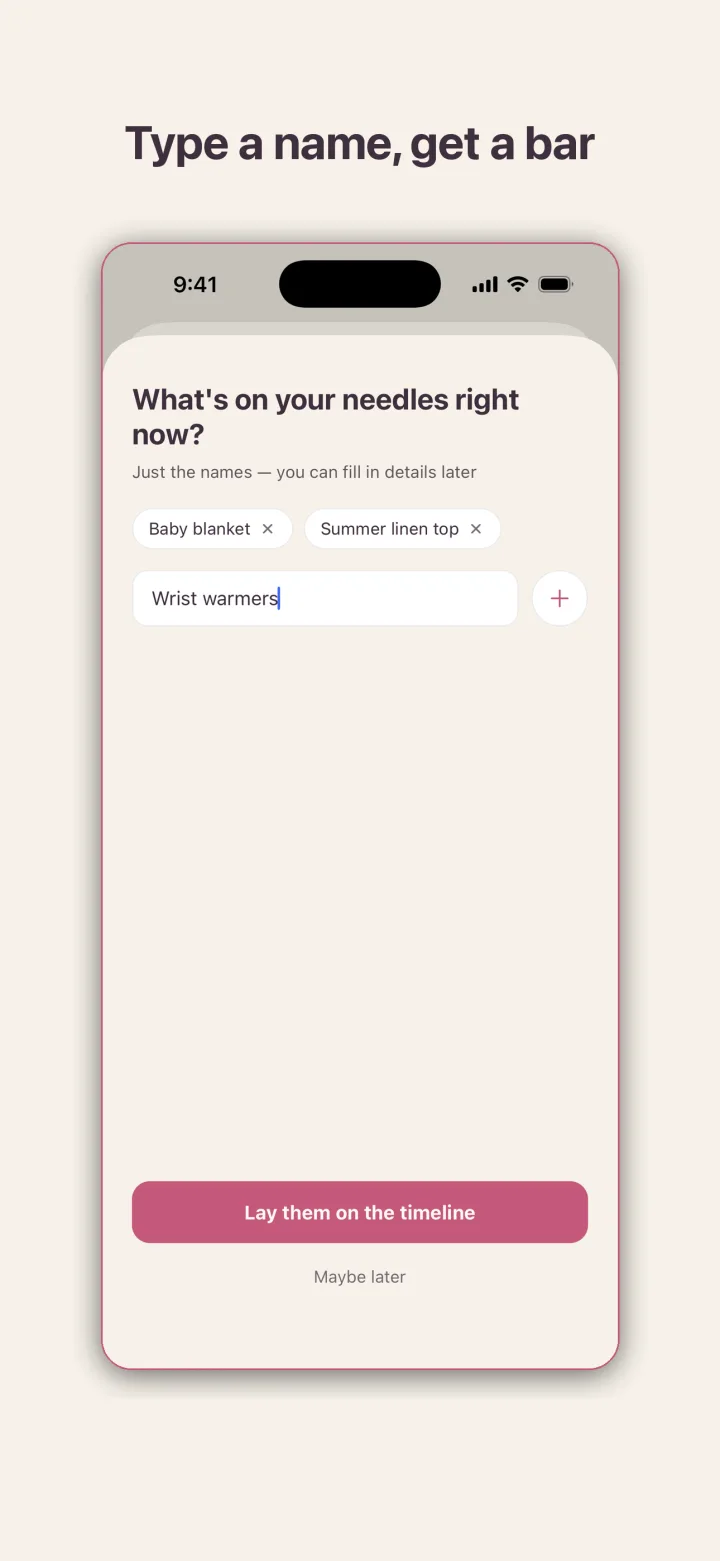
Type a name, get a bar

The quick-add screen asks what is on your needles right now and takes just names, one after another. Tap Lay them on the timeline and each name becomes a bar starting today. Yarn, needles, and pattern details can be filled in later, or never.

03

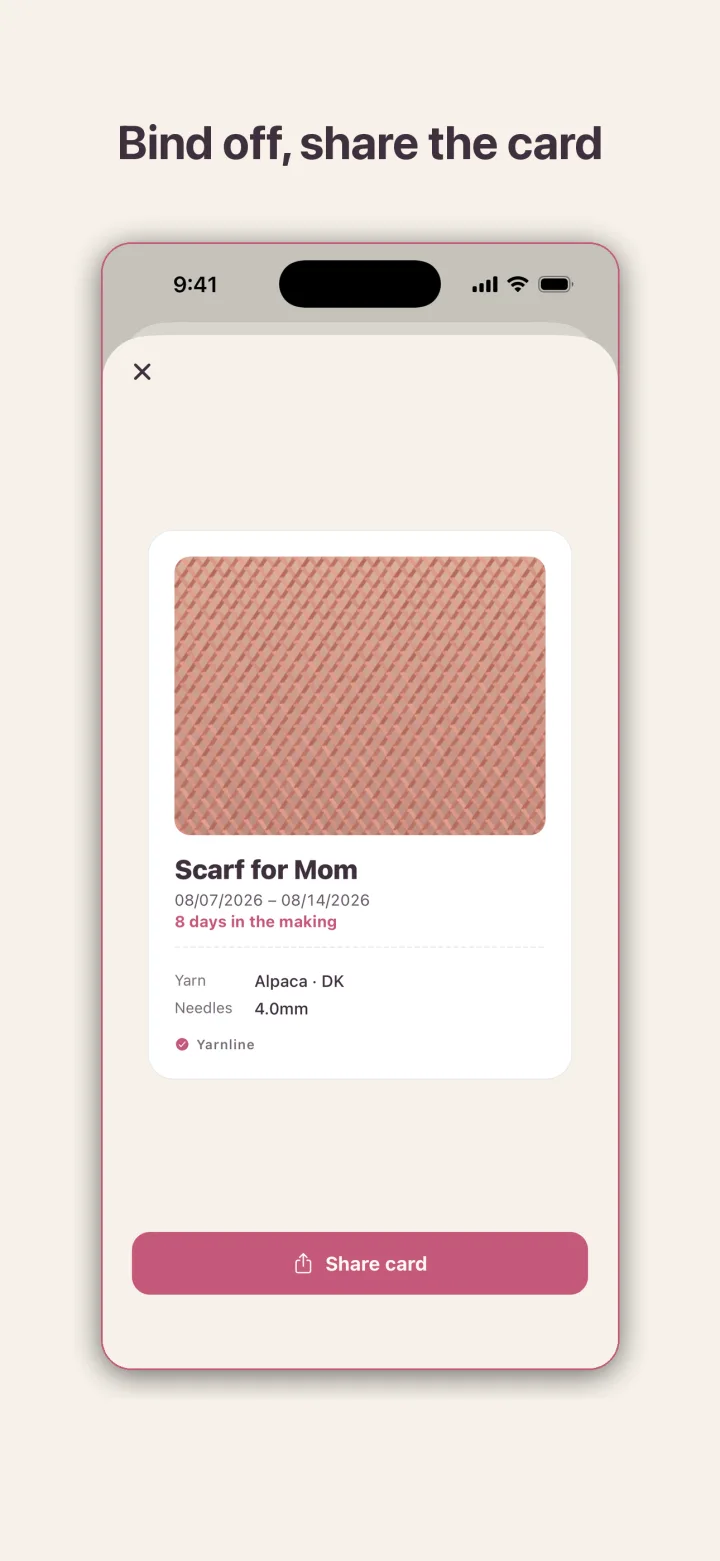
Bind off, share the card

When you mark a project finished, Yarnline sets your photo, the project name, the cast-on and bind-off dates, the days it took, and the yarn and needle details into a single card. One button shares it wherever you like.

Bars show real elapsed time

No knitter has just one project going. Yarnline is built around that: one timeline, many projects. Add your projects by name and they land on a Gantt-style timeline where every project is a bar running from cast-on day to today. One glance tells you what is on the needles, what has been sitting for a while, and which gift deadline is next.

The bars are honest. They show real elapsed time rather than a progress percentage you would have to make up. Milestones such as body done or sleeve one appear as dots along the bar, so the timeline also records how a project moved, not just that it exists. Switch between a week scale and a month scale depending on how far back you want to look.

Hibernating and frogging are part of knitting

A project you have not touched in months does not get a warning. Hibernating projects stay on the timeline as a record, and frogged projects, the ones you ripped back, stay too, because frogging is part of the craft. Active, hibernating, finished, and frogged projects sit side by side as bars on the same screen, and nothing nags you to pick one up.

For gift knitting, a project can carry a deadline. Yarnline sends a gentle reminder a week out and again the day before, and the deadline shows as a flag on the timeline.

The cast-on queue

Ideas for the next project usually live in a notes app or on a scrap of paper. In Yarnline they live in the cast-on queue: jot down what you want to make next, and the moment you actually cast on, move it onto the timeline where it becomes a live bar. Queued projects appear on the timeline as dashed outlines so you can see what is waiting without mixing it up with what is in progress.

Everything about a project in one place

Each project has its own notes: yarn brand, colorway, and weight, needle and hook sizes, the pattern and a link to it, gauge, milestones, and a row counter that lives inside the project where you need it. Finished objects collect in a gallery grouped by year, and pieces you finished before installing the app can be added retroactively so the gallery starts full.

A home screen widget puts your project bars on the phone's first screen, so checking what is in progress does not even require opening the app.

Yours alone

Yarnline is fully local. Your projects and photos never leave your phone. There is no account, no server, and no analytics. Back up everything to a JSON file whenever you like and restore it on a new device. The app is free, with no ads and no in-app purchases.

Frequently asked questions

Do I have to fill in yarn and needle details when I add a project?

No. Quick-add takes just the names. Yarn, needles, pattern, and gauge can be added later from the project's notes.

What do the bars on the timeline represent?

Real elapsed time from cast-on day to today. There is no made-up progress percentage.

What happens to a project I have not touched in months?

Nothing. It stays on the timeline as a hibernating project with no warning. Frogged projects stay on the record too.

Can I add pieces I finished before I installed the app?

Yes. Finished works can be added retroactively and they appear in the finished-object gallery grouped by year.

Is my knitting record uploaded anywhere?

No. Projects and photos stay on your phone. There is no account, no server, and no analytics. Backup is a JSON file you keep and restore yourself.

Get Yarnline

Pick the channel you use.

Get it onGoogle Play